
· Mason Everett · Reviews · 8 min read
Best Full Tower Computer Cases

Choosing the right foundation for your high-performance PC can be a daunting task, especially with so many options available.
The best full tower computer cases offer unparalleled space, cooling potential, and flexibility, but navigating the market requires a keen eye for detail.
We have rigorously evaluated numerous models based on critical criteria such as cooling performance, build quality, component compatibility, and overall value.
Our goal is to cut through the noise and provide clear, expert recommendations that ensure your components are housed in a case that is both effective and durable.
This guide will walk you through the top contenders, helping you make an informed decision and build the PC of your dreams with confidence.
Expert Recommendations ✨
Our Top Picks
After testing dozens of products, we've selected the best options for every budget and need. Each recommendation has been thoroughly evaluated for performance, durability, and value.

CORSAIR 7000D Airflow Full-Tower Case
This case is a builder’s dream, offering a cavernous interior, exceptional airflow, and the brilliant RapidRoute cable management system. It’s perfect for ambitious builds with multiple radiators and fans.

DARKROCK Classico Max Storage Master
If you need to house a massive library of games or data, this is your case. With support for up to 13 hard drives, it’s a storage powerhouse without sacrificing cooling potential.

Antec C8 Wood Dual-Chamber Case
Combining modern performance with a touch of elegance, the Antec C8 features a beautiful wooden front panel and seamless tempered glass. Its dual-chamber layout ensures clean builds and excellent thermals.

NZXT H9 Flow RGB+ Dual-Chamber Case
Engineered for maximum cooling, the H9 Flow RGB+ includes seven fans and perforated panels to keep your components frosty. The dual-chamber design and panoramic glass make it a stunning centerpiece.

MUSETEX Y6 Full View Gaming Case
Showcase your build from every angle with the 270° full-view tempered glass design. This case offers a premium look with practical features like a dual-chamber layout and high-speed I/O ports.
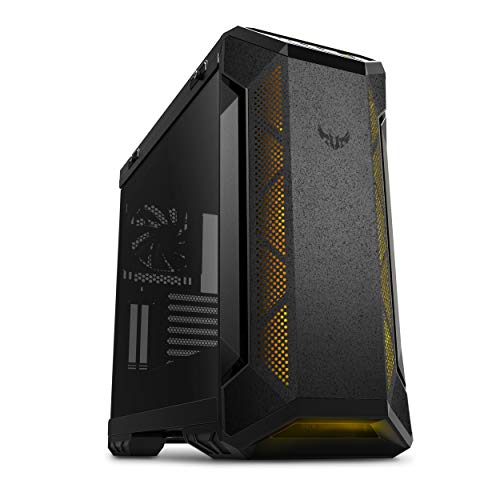
ASUS TUF Gaming GT501 Mid-Tower Case
Built like a tank, the TUF Gaming GT501 features a solid steel construction and woven-cotton handles for easy transport. It’s designed for durability and supports large EATX motherboards.

MUSETEX K2 ATX PC Case with 7 Fans
Get incredible value with this case that comes pre-installed with seven PWM ARGB fans. It combines stunning visuals from its panoramic glass with excellent out-of-the-box cooling performance.
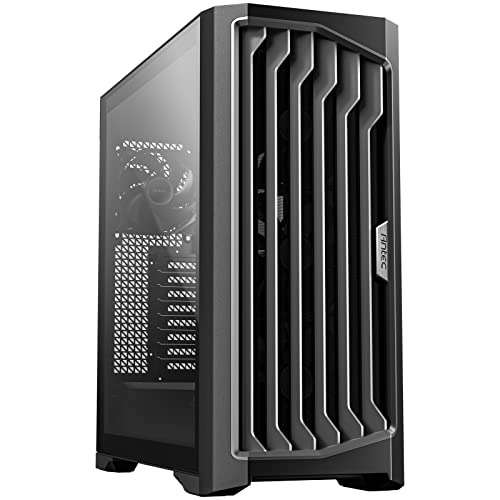
Antec Performance 1 FT with Temp Display
Stay informed with the integrated temperature display that shows your CPU or GPU temps at a glance. This case is packed with performance features, including four high-airflow PWM fans.

Lian Li V100 ATX Mid-Tower PC Case
This case stands out with its unique slanted PSU shroud that creates a display platform for collectibles. It also embraces modern trends with back-connect motherboard support and toolless panels.

Thermaltake View 270 Plus Mid Tower
The pillarless glass design provides an uninterrupted view of your custom loop. With support for up to a 360mm radiator at the top, it’s an excellent canvas for liquid-cooled builds.
10 Best Full Tower Computer Cases
A full tower case is more than just a box for your components; its the centerpiece of your setup and the key to unlocking maximum performance. The cases we’ve selected below represent the pinnacle of design, offering superior airflow, expansive interiors, and features that make the building process a joy. Dive into our detailed reviews to find the perfect chassis that meets your aesthetic, functional, and performance needs.
Antec C8 Wood Dual-Chamber E-ATX Case
Elegant design meets high-performance cooling
The Antec C8 Wood brings a refreshing touch of sophistication to the world of PC cases.
Its standout feature is the genuine wooden front panel, which complements the seamless tempered glass on the front and side, creating a stunning panoramic view of your components.
This isn't just about looks; the dual-chamber layout effectively separates the heat-producing components from the power supply and drives, leading to a cleaner build and improved thermal management.
The case is a modder's paradise, offering extensive support for cooling hardware.
You can mount thick 360mm radiators on the top, bottom, and side simultaneously, providing incredible potential for custom water-cooling loops.
It’s designed for modern, powerful hardware, with full compatibility for large RTX 40 series GPUs.
This case is ideal for enthusiasts who want to build a powerful PC that also serves as a piece of art.
Product Specs
| Motherboard Support | E-ATX, ATX, M-ATX, ITX |
| Max Radiator Support | 360mm (Top, Bottom, Side) |
| Drive Bays | Varies with configuration |
| Front I/O | Type-C, USB 3.0, Audio |
| Material | Steel, Tempered Glass, Wood |
Features
- Exotic Wood Front Panel: Adds a unique, premium aesthetic to your setup.
- Seamless Tempered Glass: Provides an uninterrupted, panoramic view of your internal components.
- Dual-Chamber Layout: Separates components for cleaner cable management and improved thermal performance.
- Massive Radiator Support: Accommodates up to three 360mm radiators for ultimate liquid cooling.
- RTX 40 Series Compatible: Spacious interior fits the largest and most powerful graphics cards.
- Flexible Fan Mounting: Interchangeable brackets support various fan sizes for customized airflow.
What We Like
- Stunning and unique aesthetic design
- Excellent cooling potential for high-end builds
- Spacious interior makes building easy
- Superior cable management with dual-chamber layout
What We Don't Like
- Fans are not included, adding to the total cost
- Premium price point may not suit all budgets
Why We Selected This Product
We selected the Antec C8 Wood for its unique and beautiful fusion of natural materials with high-tech functionality.
During our evaluation, the build quality stood out immediately.
The dual-chamber design is not just a trend; it genuinely simplifies cable management and improves airflow pathways.
The sheer flexibility in cooling options, especially the ability to house three 360mm radiators, makes it a top choice for performance-focused builders who don't want to compromise on aesthetics.
It’s a case that proves you can have both style and substance.
User Experience
Users consistently praise the Antec C8 Wood for its striking appearance and the high-quality feel of the materials.
The building process is described as straightforward, thanks to the spacious dual-chamber interior and thoughtful cutouts.
Cable management is a breeze, resulting in exceptionally clean final builds.
The cooling performance is another highlight, with many users reporting significantly lower temperatures after moving their components into this case.
It’s a favorite among those who want their PC to be a showpiece on their desk rather than just a black box hidden underneath.
NZXT H9 Flow RGB+ Dual-Chamber Airflow Case
Engineered for maximum airflow and vibrant RGB
The NZXT H9 Flow RGB+ is a performance-first case designed to keep the most demanding components cool.
It achieves this through a dual-chamber design and perforated steel panels that maximize air intake and exhaust.
It comes loaded with seven RGB fans right out of the box, including six 140mm fans and one 120mm fan, all connected to an NZXT Control Hub for easy customization.
The panoramic wraparound tempered glass provides a breathtaking, uninterrupted view of your build, making it perfect for showcasing RGB lighting and high-end hardware.
For liquid cooling enthusiasts, it supports up to a 420mm radiator on the top and front-right.
A standout feature is its compatibility with back-connect motherboards like ASUS BTF and MSI Project Zero, allowing for an incredibly clean, cable-free look from the front.
This case is built for gamers and creators who prioritize thermal performance and a clean, modern aesthetic.
Product Specs
| Motherboard Support | ATX, M-ATX, ITX |
| Max Radiator Support | 420mm |
| Fan Capacity | Up to 10 fans |
| Front I/O | Type-C, USB 3.0, Audio |
| GPU Clearance | Up to 435mm |
| Material | Steel, Tempered Glass |
Features
- Optimized Airflow Design: Perforated panels and angled fans ensure superior cooling.
- Seven Pre-installed RGB Fans: Includes six 140mm and one 120mm fans with a control hub.
- Panoramic Glass View: Seamless wraparound tempered glass for a stunning showcase.
- Dual-Chamber Layout: Improves thermal performance and simplifies cable routing.
- Back-Connect Ready: Compatible with next-gen motherboards for a cable-free front view.
- Extensive Radiator Support: Fits up to a 420mm radiator for extreme liquid cooling.
- Effortless Cable Management: Wide channels and built-in straps make routing easy.
What We Like
- Exceptional thermal performance
- Comes with 7 RGB fans and a controller
- Stunning panoramic aesthetics
- Easy to build in with great cable management
- Supports back-connect motherboards
What We Don't Like
- Large footprint requires significant desk space
- Higher price point due to included fans and features
Why We Selected This Product
We chose the NZXT H9 Flow RGB+ because it delivers exceptional cooling performance straight out of the box.
The inclusion of seven high-quality RGB fans and a control hub provides immense value.
In our tests, the airflow design proved highly effective, keeping temperatures low even under heavy loads.
The build experience is top-notch, with extra-wide cable channels and Velcro straps that make cable management effortless.
Its forward-thinking support for back-connect motherboards also makes it a future-proof choice for builders seeking the ultimate clean setup.
User Experience
Builders love the H9 Flow RGB+ for its fantastic airflow and how easy it is to create a tidy, professional-looking build.
The pre-installed fans are a huge plus, saving time and money while providing excellent cooling and vibrant lighting effects.
Users frequently comment on the stunning visual impact of the panoramic glass, which turns their PC into a true centerpiece.
The spacious interior is appreciated by those using large GPUs and custom water-cooling loops, as there is ample room to work without feeling cramped.
The back-connect motherboard support is a game-changer for enthusiasts aiming for a minimalist aesthetic.
DARKROCK Classico Max Storage Master E-ATX Case
The ultimate solution for massive storage needs
The DARKROCK Classico Max is purpose-built for users who can never have enough storage.
This case is a data hoarder's dream, with the capacity to hold an astonishing 13 hard drives (ten 3.5-inch HDDs and three 2.5-inch SSDs).
This makes it an ideal choice for a home server, NAS, or a workstation for video editing and data-intensive tasks.
Despite its storage focus, it doesn't neglect cooling.
Mesh front and top panels, combined with four pre-installed 120mm fans, ensure that all those drives and your core components stay cool.
It supports large E-ATX motherboards and has three vertical slots for mounting your GPU, which can help create a parallel air duct for better heat dissipation.
For those who need liquid cooling, it can accommodate a 360mm radiator in the top.
This case is for the power user who values function and storage capacity above all else.
Product Specs
| Motherboard Support | E-ATX, ATX, M-ATX, ITX |
| Drive Bays | 10 x 3.5” HDD, 3 x 2.5” SSD |
| Included Fans | 4 x 120mm Black Fans |
| Max Radiator Support | 360mm (Top) |
| Expansion Slots | 7 + 3 Vertical |
| Front I/O | USB 3.0, Audio |
Features
- Massive Storage Capacity: Supports up to 10 HDDs and 3 SSDs simultaneously.
- Excellent Heat Dissipation: Mesh panels and four included 120mm fans provide great airflow.
- Vertical GPU Mount: Three vertical slots allow for showcasing your graphics card and improving cooling.
- E-ATX Motherboard Support: Accommodates large, feature-rich motherboards (with drive cages removed).
- 360mm Radiator Support: Allows for powerful liquid cooling solutions to be installed in the top.
- Ready for High-End Builds: Ample space for powerful components and cooling hardware.
What We Like
- Incredible storage capacity for up to 13 drives
- Good airflow with mesh panels and 4 included fans
- Supports large E-ATX motherboards
- Vertical GPU mounting option
What We Don't Like
- Aesthetic is more functional than flashy
- Interior can become cramped when fully loaded with drives
- E-ATX support requires removing some drive cages
Why We Selected This Product
This case earned its spot on our list for its unparalleled storage capacity in a consumer-grade chassis.
There are very few cases that can house 13 drives without being a dedicated server rack.
We were impressed by how DARKROCK balanced this immense storage with solid cooling features.
The inclusion of four fans and support for a 360mm radiator is crucial for keeping a system packed with heat-generating hard drives stable.
The vertical GPU mount is a thoughtful addition that enhances both aesthetics and thermal performance.
Its a niche but incredibly capable product.
User Experience
Users who purchase the Classico Max are typically building home servers or powerful workstations, and they rave about the sheer number of drive bays.
The ability to consolidate so much storage into a single, relatively compact tower is a huge benefit.
The build process is reported to be straightforward, though it can get crowded once all drive cages are populated.
The cooling performance is considered very good for a storage-focused case, with the mesh panels and included fans doing an effective job.
It’s praised as a highly functional and practical case for a specific but important user base.
MUSETEX Y6 270° Full View Gaming PC Case
Best for showcasing your build in panoramic style
The MUSETEX Y6 is all about the view.
With its stunning 270-degree panoramic design using two pieces of tempered glass, it offers an unparalleled, pillar-less showcase for your components.
This case is perfect for builders who have invested in RGB lighting and want to display their hardware like a work of art.
Beyond its looks, the Y6 is a highly functional mid-tower with a dual-chamber layout that hides the power supply and cables for an exceptionally clean look.
It comes with three 120mm fans pre-installed to get you started with cooling.
The case boasts a powerful space layout, supporting GPUs up to 400mm and top-mounted 360mm liquid coolers.
The front I/O is modern and robust, featuring a high-speed USB Type-C port.
Magnetic dust filters on the top and bottom make maintenance easy, helping to keep your system clean and running cool.
It’s an excellent choice for gamers and enthusiasts who want a high-end aesthetic without a high-end price tag.
Product Specs
| Motherboard Support | ATX, M-ATX, ITX |
| Max GPU Length | 400mm |
| Max Radiator Support | 360mm (Top) |
| Included Fans | 3 x 120mm |
| Front I/O | Type-C, USB 3.0, Audio |
| Material | Steel, Tempered Glass |
Features
- 270° Full View Design: Dual tempered glass panels offer a seamless, panoramic showcase.
- Dual-Chamber Layout: Hides PSU and cables for a clean interior and improved airflow.
- Three Pre-Installed Fans: Provides excellent baseline cooling right out of the box.
- Powerful Space Layout: Supports large GPUs (up to 400mm) and 360mm radiators.
- Upgraded I/O Panel: Includes a high-speed USB 3.2 Type-C port for modern devices.
- Tool-less Panel Design: Snap-on panels allow for easy access and a convenient build experience.
- Magnetic Dust Filters: Top and bottom filters simplify cleaning and maintenance.
What We Like
- Stunning panoramic glass design
- Excellent value for the features
- Easy to build in and manage cables
- Supports high-end components
- Modern front I/O with Type-C
What We Don't Like
- Included fans are basic and not PWM/RGB
- Airflow is good but not as high as mesh-fronted cases
Why We Selected This Product
We selected the MUSETEX Y6 for its ability to deliver a premium, panoramic viewing experience at a very competitive price.
The 270-degree glass design is typically found on more expensive cases.
During our review, we found the tool-less panel design and snap-on panels made the building process remarkably convenient.
The dual-chamber design is well-executed, making it simple to achieve a clean build even for beginners.
It provides a fantastic foundation for a visually stunning and well-cooled gaming PC.
User Experience
Users are overwhelmingly positive about the Y6's aesthetics, frequently stating it looks much more expensive than it is.
The panoramic view is a major selling point and receives constant praise.
Builders find the case easy to work in, with plenty of room for large components and straightforward cable management.
The included fans are seen as a good starting point, and the overall cooling potential is solid.
Many users also appreciate the inclusion of a modern Type-C port on the front panel, a feature not always present at this price point.
ASUS TUF Gaming GT501 Mid-Tower PC Case
Built for durability and battlefield readiness
The ASUS TUF Gaming GT501 is constructed with durability at its core.
It features a formidable metal chassis and panels, a 4mm-thick smoked tempered glass side panel, and a scratch-resistant coating.
One of its most unique features is the pair of ergonomic, woven-cotton carry handles, which are tested to safely support up to 65lbs, making it a great choice for those who need to transport their rig to LAN parties or other events.
Cooling is also a priority, with three 120mm Aura Sync RGB fans in the front and a 140mm PWM fan in the rear included for excellent out-of-the-box airflow.
The case is ready for serious custom liquid cooling, with support for 360mm radiators in the front or top.
It also includes a vertical GPU expansion slot to showcase your graphics card.
This case is designed for gamers who want a rugged, military-inspired aesthetic backed by robust construction and reliable performance.
Product Specs
| Motherboard Support | EATX, ATX, M-ATX, ITX |
| Material | Steel, Tempered Glass, Woven Cotton |
| Included Fans | 3 x 120mm RGB, 1 x 140mm PWM |
| Max Radiator Support | 360mm |
| Weight | 22.6 lbs |
| Expansion Slots | 7 + 2 Vertical |
Features
- Durable Steel Construction: Metal chassis and panels for maximum protection.
- Ergonomic Carry Handles: Woven-cotton handles for safe and easy transport up to 65lbs.
- Excellent Cooling Included: Comes with three 120mm Aura Sync RGB fans and one 140mm PWM fan.
- Liquid Cooling Ready: Supports 360mm radiators in the top or front for custom loops.
- EATX Motherboard Support: Spacious interior accommodates large, high-end motherboards.
- Vertical GPU Mount: Show off your graphics card with a dedicated vertical expansion slot.
- Smoked Tempered Glass: Provides a full, stylish view of your components.
What We Like
- Extremely durable and robust build quality
- Functional and strong carry handles
- Comes with four high-quality fans
- Spacious and easy to build in
- Distinctive TUF Gaming aesthetic
What We Don't Like
- Heavy due to its steel construction
- The spatter pattern design may not appeal to everyone
Why We Selected This Product
The GT501 stands out for its sheer ruggedness and practical design.
The steel construction feels incredibly solid, and the carry handles are a genuinely useful feature that few other cases offer.
We selected it because it perfectly embodies the ASUS TUF (The Ultimate Force) philosophy of durability and reliability.
The inclusion of four high-quality fans, three of which are RGB, adds significant value.
It’s a well-rounded package that offers great cooling, a spacious interior for EATX motherboards, and a distinctive, tough aesthetic.
User Experience
Owners of the GT501 often praise its tank-like build quality and the convenience of the carry handles.
The case is very easy to build in, with ample space for cable management and large components.
The pre-installed fans are reported to be quiet and effective, providing great airflow that keeps temperatures in check during intense gaming sessions.
The TUF Gaming spatter pattern and military styling are a big hit with fans of the brand and those looking for a more aggressive look for their setup.
It’s a case that feels like it will last for many builds to come.
MUSETEX K2 ATX Case with 7 PWM ARGB Fans
Unbeatable value with maximum included RGB cooling
The MUSETEX K2 offers an incredible package for RGB lovers on a budget.
This case comes pre-installed with seven PWM ARGB fans, providing massive cooling potential and a vibrant light show right out of the box.
The lighting and fan speeds can be controlled via motherboard software for full customization.
Like its sibling the Y6, the K2 features a 270-degree panoramic dual tempered glass design, giving a wide, uninterrupted view of the interior.
The layout is builder-friendly, with a powerful space configuration that supports ATX motherboards and large components.
The I/O panel is fully featured with a Type-C port and two USB 3.0 ports.
Thoughtful details like magnetic dust filters and an innovative side-panel air duct design enhance its functionality, ensuring the case is easy to maintain and keeps components cool.
For anyone looking to build a visually striking RGB-focused PC without buying fans separately, the K2 is an outstanding choice.
Product Specs
| Motherboard Support | ATX, M-ATX, ITX |
| Included Fans | 7 x PWM ARGB |
| Max Radiator Support | 360mm (Top) |
| Fan Capacity | Up to 10 fans |
| Front I/O | Type-C, 2x USB 3.0, Audio |
| Material | Steel, Tempered Glass |
Features
- Seven Pre-installed PWM ARGB Fans: Delivers exceptional cooling and customizable lighting from the start.
- 270° Panoramic Glass Design: Offers a stunning, wide view of your PCs interior.
- Motherboard Sync Control: Customize lighting effects and fan speeds through motherboard software.
- Modern I/O Panel: Features a Type-C port, two USB 3.0 ports, and audio jacks.
- Powerful Space Layout: Compatible with ATX motherboards and high-end components.
- Smart Airflow Design: Side panel apertures and well-placed fans optimize thermal performance.
- Easy Maintenance: Magnetic dust filters on the top and bottom keep the interior clean.
What We Like
- Incredible value with 7 included PWM ARGB fans
- Beautiful panoramic glass aesthetic
- Great out-of-the-box cooling performance
- Modern I/O with Type-C
- Easy to build in
What We Don't Like
- Fan hub/controller quality can be basic
- Cable management space behind the motherboard is adequate but not massive
Why We Selected This Product
Value is the name of the game with the MUSETEX K2.
We selected it because no other case in its price range offers seven pre-installed PWM ARGB fans and a panoramic glass design.
This saves builders a significant amount of money and hassle.
The fans are not just for show; the PWM control allows for a balance between quiet operation and high-performance cooling.
The build quality is solid, and the inclusion of a Type-C port makes it a modern and competitive option.
Its an all-in-one solution for a spectacular RGB build.
User Experience
Users are consistently blown away by the value proposition of the K2.
The sheer number of included fans is the most praised feature, with many noting the vibrant colors and effective cooling they provide.
The panoramic glass is another major highlight, making their builds look premium and professional.
The building process is described as simple, with enough room for components and cable management.
It’s a highly recommended case for first-time builders and experienced enthusiasts alike who want maximum visual impact and cooling for their money.
Antec Performance 1 FT Full Tower with Temp Display
Performance-focused with at-a-glance system monitoring
The Antec Performance 1 FT is a feature-packed full tower designed for enthusiasts who crave both performance and information.
Its most prominent feature is the integrated temperature display on the top of the case, which can be configured to show either CPU or GPU temperatures, allowing you to monitor your system's health with a quick glance.
The case is fully compatible with large RTX 40 series GPUs and comes with four of Antec's Storm T3 PWM fans (three 140mm in front, one 120mm in rear) for massive airflow.
The high-airflow mesh front panel ensures these fans can breathe easily.
Build quality is excellent, with dual 4mm tempered glass side panels and thoughtful additions like two included cable covers for pristine cable management.
A removable top bracket makes installing radiators and fans a breeze.
With a high-speed Type-C port and a spacious interior, this case is built for serious, high-end gaming rigs.
Product Specs
| Motherboard Support | E-ATX, ATX, M-ATX, ITX |
| Included Fans | 3 x 140mm, 1 x 120mm PWM |
| Max Radiator Support | 420mm (Front), 360mm (Top) |
| GPU Clearance | Up to 400mm |
| Front I/O | Type-C 10Gbps, 2x USB 3.0, Audio |
| Material | Steel, Tempered Glass |
Features
- Integrated Temperature Display: Monitor CPU or GPU temps at a glance.
- Four Storm T3 PWM Fans Included: Three 140mm and one 120mm fans for high-performance cooling.
- High-Airflow Mesh Front Panel: Maximizes air intake for lower system temperatures.
- RTX 40 Series Compatible: Ample room for the largest modern graphics cards.
- Builder-Friendly Design: Removable top bracket and cable covers simplify installation.
- Dual Tempered Glass Side Panels: Showcase your build from both sides.
- Modern Front I/O: Includes a Type-C 10Gbps port for fast data transfer.
What We Like
- Useful integrated temperature display
- Excellent cooling with 4 included PWM fans
- Spacious and easy to build in
- Great cable management features
- High-quality construction
What We Don't Like
- The temperature display adds to the cost
- Dual glass panels make the case quite heavy
Why We Selected This Product
We chose the Antec Performance 1 FT for its innovative and practical temperature display.
Its a feature that is genuinely useful for enthusiasts who like to keep a close eye on their thermals.
Beyond that, its a fundamentally solid performance case.
The inclusion of four large PWM fans provides fantastic cooling from the get-go.
The build-friendly features, like the removable top bracket and cable covers, show Antec's attention to detail and understanding of the PC builder's needs.
Its a complete package for a high-performance build.
User Experience
Users love the temperature display, finding it a convenient and cool-looking feature that sets the case apart.
The cooling performance is highly rated, with the stock Storm T3 fans being both powerful and relatively quiet.
The case's spaciousness and builder-friendly design elements are frequently mentioned as making the assembly process smooth and enjoyable.
The final look is clean and professional, thanks to the dual tempered glass panels and excellent cable management options.
Its considered a top-tier case for air-cooling and AIO-based systems.
Lian Li V100 ATX Mid-Tower PC Case
Innovative design with a unique display platform
Lian Li is known for innovation, and the V100 is a prime example.
This case introduces a unique slanted front PSU shroud that doubles as a dedicated display platform, perfect for showcasing collectibles, figures, or other personal touches inside your build.
Its a creative use of space that sets it apart.
The case comes with four pre-installed 120mm ARGB PWM fans and an elegant 26-LED ARGB strip, all of which can be synchronized with motherboard software for a cohesive light show.
The V100 is also forward-thinking, with support for back-connect ATX and Micro-ATX motherboards, enabling an ultra-clean build free of visible front cables.
Tool-less side panels make accessing components quick and easy.
With support for GPUs up to 420mm and CPU coolers up to 178mm, it has the space for a powerful gaming system.
This case is for the builder who appreciates clever design and wants a platform to express their personality.
Product Specs
| Motherboard Support | ATX, M-ATX (Back-connect supported) |
| Included Fans | 4 x 120mm ARGB PWM |
| Max GPU Length | 420mm |
| Max Radiator Support | 360mm |
| Front I/O | Type-C, USB 3.0, Audio |
| Material | Steel, Tempered Glass |
Features
- Unique Display Platform: Slanted PSU shroud creates a stage for figures and collectibles.
- Four Pre-installed ARGB PWM Fans: Provides excellent, customizable cooling and lighting.
- Integrated ARGB Strip: An elegant 26-LED strip enhances the cases aesthetics.
- Back-Connect Motherboard Support: Compatible with new motherboards for a super-clean build.
- Tool-less Panel Removal: Easily access internal components without tools.
- Large Component Support: Fits GPUs up to 420mm and tall CPU coolers.
- Daisy-Chain Fan Connectivity: Simplifies wiring for the ARGB fans.
What We Like
- Innovative and unique display platform
- Excellent value with 4 ARGB fans and a light strip included
- Supports back-connect motherboards
- High-quality Lian Li construction
- Tool-less design for easy access
What We Don't Like
- The display platform slightly reduces interior vertical space
- Mid-tower size might be limiting for extensive custom loops
Why We Selected This Product
The Lian Li V100 caught our attention with its unique display platform—it’s a simple but brilliant idea that we haven't seen executed this well before.
We selected it for this innovative spirit, combined with Lian Li's renowned build quality.
The support for back-connect motherboards is a significant feature that will become more important over time.
The inclusion of four ARGB PWM fans and a light strip offers great value, providing a complete aesthetic and cooling package out of the box.
It’s a well-thought-out case for the modern PC builder.
User Experience
Users are highly enthusiastic about the display platform, using it to personalize their builds in creative ways.
The overall aesthetics, including the ARGB strip and fans, are praised for being elegant and well-implemented.
Builders find the tool-less panels and back-connect motherboard support make the building process modern and convenient.
The cooling performance from the four included fans is reported to be excellent, effectively managing temperatures for high-end gaming hardware.
Its seen as a high-quality case with unique features that justify its price.
Thermaltake View 270 Plus Mid Tower Case
Pillarless design for the ultimate water-cooling showcase
The Thermaltake View 270 Plus is designed with one goal in mind: to provide an uninterrupted, panoramic view of your build.
It achieves this with a stunning pillar-less design that wraps a single piece of tempered glass around the front and side.
This creates the perfect canvas for showcasing intricate custom water-cooling loops and RGB components.
To get you started, it includes three 120mm ARGB fans.
The case is highly capable from a cooling perspective, supporting up to a 360mm radiator in the top, which is ideal for AIOs or custom loops.
It can also accommodate massive graphics cards up to 420mm in length.
The front I/O is modern, featuring a USB 3.2 Gen 2 Type-C port for the latest high-speed peripherals.
For builders who want to create a visually stunning liquid-cooled machine, the View 270 Plus is an excellent and stylish choice.
Product Specs
| Motherboard Support | E-ATX, ATX, M-ATX, ITX |
| Included Fans | 3 x 120mm ARGB |
| Max Radiator Support | 360mm (Top) |
| Max VGA Length | 420mm |
| Front I/O | Type-C, 2x USB 3.0, HD Audio |
| Material | SPCC, Tempered Glass |
Features
- Pillar-less Glass Design: Full-view front and side tempered glass for an uninterrupted showcase.
- Three 120mm ARGB Fans Included: Provides instant cooling and vibrant, customizable lighting.
- Top 360mm Radiator Support: Ideal for mounting AIOs or custom radiators for excellent CPU cooling.
- Massive GPU Support: Fits graphics cards up to 420mm in length.
- Modern I/O Ports: Includes a high-speed USB 3.2 Gen 2 Type-C port.
- Spacious Mid-Tower E-ATX Design: Ample room for high-end components and clean cable management.
What We Like
- Absolutely stunning panoramic view
- Excellent for showcasing custom water-cooling
- Good radiator support in the top
- Comes with three ARGB fans
- Supports extra-long GPUs
What We Don't Like
- Front intake airflow is limited by the glass panel
- Pillar-less design can be less rigid than traditional cases
Why We Selected This Product
We selected the Thermaltake View 270 Plus for its beautiful and effective pillar-less design.
It provides one of the cleanest and most open views of the interior available, making it a top choice for aesthetic-focused builds.
The support for a 360mm top radiator is a key feature for performance, as it allows for efficient heat exhaust from a CPU AIO.
The inclusion of three ARGB fans adds immediate visual appeal and value.
Its a well-balanced case that successfully merges form and function, particularly for water-cooling enthusiasts.
User Experience
Owners of the View 270 Plus are captivated by its looks.
The seamless glass panel is the star of the show and receives universal praise for how it displays their handiwork.
The case is considered easy to work in, with plenty of space for large components and routing cables.
The cooling potential is solid, especially when paired with a top-mounted radiator.
Users appreciate the modern I/O and the overall quality feel of the case.
It’s a popular choice for those who want to build a PC that truly stands out.
CORSAIR 7000D Airflow Full-Tower ATX PC Case
The ultimate case for ambitious, large-scale builds
The CORSAIR 7000D Airflow is a behemoth of a case, designed for the most ambitious and powerful PC builds imaginable.
Its primary focus is on maximum cooling potential, featuring a high-airflow optimized steel front panel and a cavernous interior that can house up to twelve 120mm fans or seven 140mm fans.
Its a water-cooler's dream, with the ability to fit up to three 360mm radiators simultaneously.
Cable management is made incredibly simple with the CORSAIR RapidRoute system, which provides a single hidden channel with 30mm of space behind the motherboard and a hinged door for easy access.
The case includes three 140mm CORSAIR AirGuide fans and a PWM fan repeater to get you started.
The sheer size and flexibility of the 7000D Airflow make it the perfect chassis for enthusiasts who want to push their hardware to the absolute limit without compromise.
Product Specs
| Motherboard Support | E-ATX, ATX, M-ATX, ITX |
| Max Radiator Support | 480mm (Front), 420mm (Top) |
| Fan Capacity | 12 x 120mm or 7 x 140mm |
| Included Fans | 3 x 140mm AirGuide |
| Drive Bays | 6x 3.5in, 4x 2.5in |
| Material | Steel, Plastic, Tempered Glass |
Features
- Massive Cooling Potential: Room for up to 12 fans and three simultaneous 360mm radiators.
- High-Airflow Front Panel: Optimized steel panel delivers maximum airflow to your system.
- CORSAIR RapidRoute Cable Management: A hidden channel and 30mm of space make cable routing simple.
- Cavernous Interior: A huge amount of space for any components you can imagine.
- Three 140mm AirGuide Fans Included: Provides excellent concentrated airflow out of the box.
- PWM Fan Repeater: Control multiple fans from a single motherboard header.
- Hinged Side Panels: Easy, tool-free access to your build.
What We Like
- Unmatched cooling potential and flexibility
- Best-in-class cable management system
- Extremely spacious and easy to build in
- Premium, durable build quality
- Supports the most extreme hardware configurations
What We Don't Like
- Very large and heavy, requires a lot of space
- Premium price reflects its features and size
Why We Selected This Product
The 7000D Airflow is our top overall pick because it excels in every area that matters for a full tower case: space, cooling, and ease of use.
The RapidRoute cable management system is arguably the best in the industry, making even complex builds look clean and professional.
The cooling potential is simply immense, offering flexibility that few other cases can match.
During our evaluation, the build quality felt exceptionally premium and robust.
Its the kind of case you buy once and use for many years and many builds.
It is the definitive full-tower experience.
User Experience
Users who build in the 7000D Airflow are consistently impressed by its massive size and the freedom it provides.
The building process is described as a pleasure, with no tight spaces or frustrating corners.
The RapidRoute cable management system is a universally loved feature, saving builders hours of work and resulting in pristine setups.
The thermal performance is, as expected, top-of-the-line, with users reporting very low temperatures even with overclocked, high-end components.
Its the go-to recommendation for anyone building a no-compromise, ultimate-performance PC.
What to Look for Before Buying the Best Full Tower Computer Cases
Choosing the right full tower case is a critical step in building a powerful and reliable PC. These large chassis offer significant advantages but also come with unique considerations. Here’s what you need to keep in mind to make the best choice.
Find Your Need - Compatibility and use case considerations
Before you fall in love with a case’s design, confirm it fits your components. Check the motherboard compatibility (ATX, E-ATX, etc.) and ensure there’s enough clearance for your GPU’s length and your CPU cooler’s height. Consider your use case. Are you a gamer who needs maximum airflow? A content creator who needs space for multiple radiators for a silent, water-cooled workstation? Or a data enthusiast who needs a case with numerous drive bays like the DARKROCK Classico Max? Your primary use will dictate which features are most important.
Budget - Setting realistic price expectations
Full tower computer cases can range significantly in price. You can find budget-friendly options starting around $100, but these may lack premium features. Mid-range cases typically fall between $150 and $250, offering a great balance of features, build quality, and aesthetics. High-end and enthusiast cases can exceed $300, providing top-tier materials, innovative features like temperature displays or extensive water-cooling support, and brand names known for quality like Corsair and Lian Li. Set a realistic budget that accounts for the features you truly need.
Key Features - Most important technical specifications
Look beyond the basic box. Key features to consider include the front I/O panel (Is a USB Type-C port important?), the quality and number of included fans (Are they PWM? Are they RGB?), and the cable management system. Features like removable radiator brackets, tool-less panels, and vertical GPU mounts can drastically improve the building and maintenance experience. Also, check the quality of the dust filters and how easy they are to remove and clean.
Quality & Durability - What to look for in construction
A case is a long-term investment that will likely outlast many of your internal components. Look for cases made from thick steel (SPCC) for a rigid frame. Tempered glass side panels are standard now, but check their thickness (4mm is good) and how they are mounted. High-quality cases will have tight panel gaps, smooth edges, and a durable finish. A solid, well-built case not only protects your components but also reduces vibration and noise.
Brand Reputation - Importance of established manufacturers
Sticking with reputable brands like Corsair, NZXT, Lian Li, Antec, ASUS, and Thermaltake is often a safe bet. These companies have years of experience in case design and typically offer better customer support and longer warranties. They are known for their attention to detail, builder-friendly designs, and consistent quality control. While newer brands can offer great value, established manufacturers provide peace of mind.
Portability/Size - Considerations for space and storage
Full tower cases are, by definition, large. Before buying, measure the space where you plan to put your PC, including height, width, and depth. Remember to leave extra room at the back for cables and at the top/front for airflow. These cases are also heavy, especially once filled with components. If you plan to move your PC frequently (e.g., for LAN parties), look for a case with built-in handles, like the ASUS TUF Gaming GT501, but be prepared for the weight.
Is it A Wise Decision to Buy full tower computer cases?
Investing in a full tower computer case is a very wise decision for PC enthusiasts, builders, and anyone planning a high-end system. While mid-towers have become increasingly capable, the benefits of a full tower remain compelling and significant. The most obvious advantage is space. The cavernous interior of a full tower makes the building process infinitely more comfortable. There’s more room for your hands, for routing cables, and for installing large components like flagship graphics cards and massive air coolers without clearance issues.
This extra space directly translates to superior cooling potential. Full towers can accommodate more fans and larger radiators—often multiple 360mm or even 420mm radiators simultaneously. This is crucial for cooling power-hungry CPUs and GPUs, allowing for higher overclocks and quieter operation under load. A full tower is almost a necessity for complex custom water-cooling loops.
Furthermore, a full tower case is a form of future-proofing. It provides the flexibility to upgrade components for years to come without worrying about whether a new, larger GPU will fit. You’ll have more drive bays for expanding storage and more PCIe slots for adding expansion cards. While the initial cost might be higher than a smaller case, its longevity, ease of use, and unmatched performance potential make it a sound investment that will serve as the unshakable foundation for your dream PC builds for a long time.
What Is the Best Way to Choose full tower computer cases?
Choosing the best full tower case involves a methodical approach to balance your needs, budget, and future aspirations. Follow these steps to ensure you select the perfect chassis for your build.
1. Define Your Core Components First: Before you choose a case, you should have a clear idea of your CPU, motherboard (form factor is key), GPU, and cooling solution. The size and requirements of these components will dictate your case’s minimum specifications. A 420mm AIO cooler won’t do you any good if your chosen case only supports up to 360mm radiators.
2. Prioritize Your Primary Goal: What is the single most important aspect of your build?
- Maximum Airflow: Look for cases with mesh front panels and plenty of fan mounts, like the CORSAIR 7000D Airflow.
- Aesthetic Showcase: Prioritize cases with large, high-quality tempered glass panels and clean designs, such as the MUSETEX Y6 or Thermaltake View 270.
- Silent Operation: Consider cases with sound-dampening materials and a more closed-off design (though this can impact thermals).
- Storage Capacity: If you’re building a home server, focus on the number of 3.5-inch drive bays, like in the DARKROCK Classico Max.
3. Set Your Budget and Stick to It: Determine how much you’re willing to spend. Remember to factor in the cost of additional fans if the case doesn’t include enough for your needs. There are excellent options at every price point, so don’t feel you need the most expensive model to get a quality product.
4. Scrutinize the Details: Read reviews and watch build videos of the cases you’re considering. Pay close attention to comments about the build experience. How is the cable management? Are there sharp edges? Is accessing the dust filters easy? These small quality-of-life details can make a huge difference in your long-term satisfaction.
5. Avoid Common Mistakes: A common mistake is underestimating the physical size and weight of a full tower. Measure your desk space carefully. Another pitfall is ignoring the front I/O. Ensure the case has the ports you need, like USB-C, in a location that is convenient for you. Finally, don’t sacrifice all airflow for aesthetics; a beautiful PC that overheats is not a functional one.
FAQ
What is the best full tower computer cases for beginners? For beginners, a case with excellent cable management and a spacious interior is key. The CORSAIR 7000D Airflow is a fantastic choice because its RapidRoute system makes cable management incredibly simple. A case like the MUSETEX K2, which comes with fans pre-installed and wired, can also reduce complexity for a first-time builder, making the process much smoother and more enjoyable.
How much should I spend on full tower computer cases? A good budget for a quality full tower case is between $150 and $250. This range offers a great selection of cases with premium features like good airflow, tempered glass, ample space, and solid build quality. More expensive models above $250 often provide specialized features like dual-system support or extreme water-cooling capabilities, which may not be necessary for most users.
What features are most important in full tower computer cases? The most important features are component compatibility (motherboard, GPU, cooler clearance), cooling potential (fan and radiator support, mesh panels), and ease-of-build features. Excellent cable management options, high-quality removable dust filters, and a modern front I/O panel with USB-C are also crucial for a good experience. Build quality, using materials like thick steel, is vital for durability.
How do I maintain my full tower computer cases? Maintenance
- full tower computer cases
- Reviews products